Design Project Management: A Practical Guide to Delivery
Learn how design project management works, from briefs and production workflows to feedback, measurement and delivery, with practical steps.
The campaign should be ready for launch, but the brief lives in scattered chat threads, the layout was approved before the copy was final, and nobody can identify the version the client signed off. Your designer is making changes while your developer waits. Everyone's busy, yet nobody can confidently say what happens next.
That's where design project management earns its place. The job isn't to make designers work faster. It's to make sure people receive usable inputs, make decisions at the right time, and pass approved work forward without losing the record.
What Design Project Management Means and Why It Matters
Design project management means planning, coordinating, and delivering creative work through briefing, research, production, review, and handoff while balancing time, budget, scope, and quality.
Think of a film set. The creative director shapes the look; the production manager connects the schedule, crew, locations, and budget. In a studio, a project lead does similar coordination so the designer can concentrate on solving the design problem.
Design differs from more predictable production work because people develop their judgment as they see options. A stakeholder might understand what they need only after reviewing a concept. Your plan therefore needs room for exploration and decisions, not an assumption that the first draft will be accepted.
Coordination makes creative decisions usable
In the stalled campaign, the immediate fix isn't another status meeting. The project lead needs to establish which brief governs the work, whether the copy is ready, and who can approve the layout. Each answer changes what someone can safely start.
The stakes extend beyond creative teams. PMI's 2013 Pulse of the Profession report reported that fewer than two-thirds of projects met their original goals and business intent, while approximately 17% failed outright. Those are broad project findings, not design-studio failure rates, but they explain why delivery deserves deliberate management.
Practical rule: Before assigning production work, check that someone owns the input, someone owns the task, and someone has authority to accept the result.
A schedule alone can't supply those answers. Coordination is a delivery skill, not administrative overhead.
Mapping Stages, Owners and Dependencies
| Stage | Goal | Owner | Output | Exit check |
|---|---|---|---|---|
| Brief | Define the problem and success criteria | Client or lead designer | Written brief | Scope, budget and deadline signed |
| Research | Establish audience needs and constraints | Strategist or researcher | Findings summary | Agreed problem statement |
| Concept | Explore distinct directions | Designers | A small set of concept directions | A direction chosen by the decision maker |
| Review | Consolidate and resolve feedback | Project lead with stakeholders | Consolidated feedback log | Approved direction and logged decisions |
| Production | Build final assets to the brief | Designers and developers | Final assets | Quality check passed against the brief |
| Handoff | Deliver and close the project | Project lead | Delivered files and documentation | Client acceptance recorded |
A stage closes when its exit check is met, not when the person doing the work feels finished. A designer may have completed a concept presentation, but production shouldn't start while the decision maker is still choosing a direction.
The workflow below makes those transitions visible.
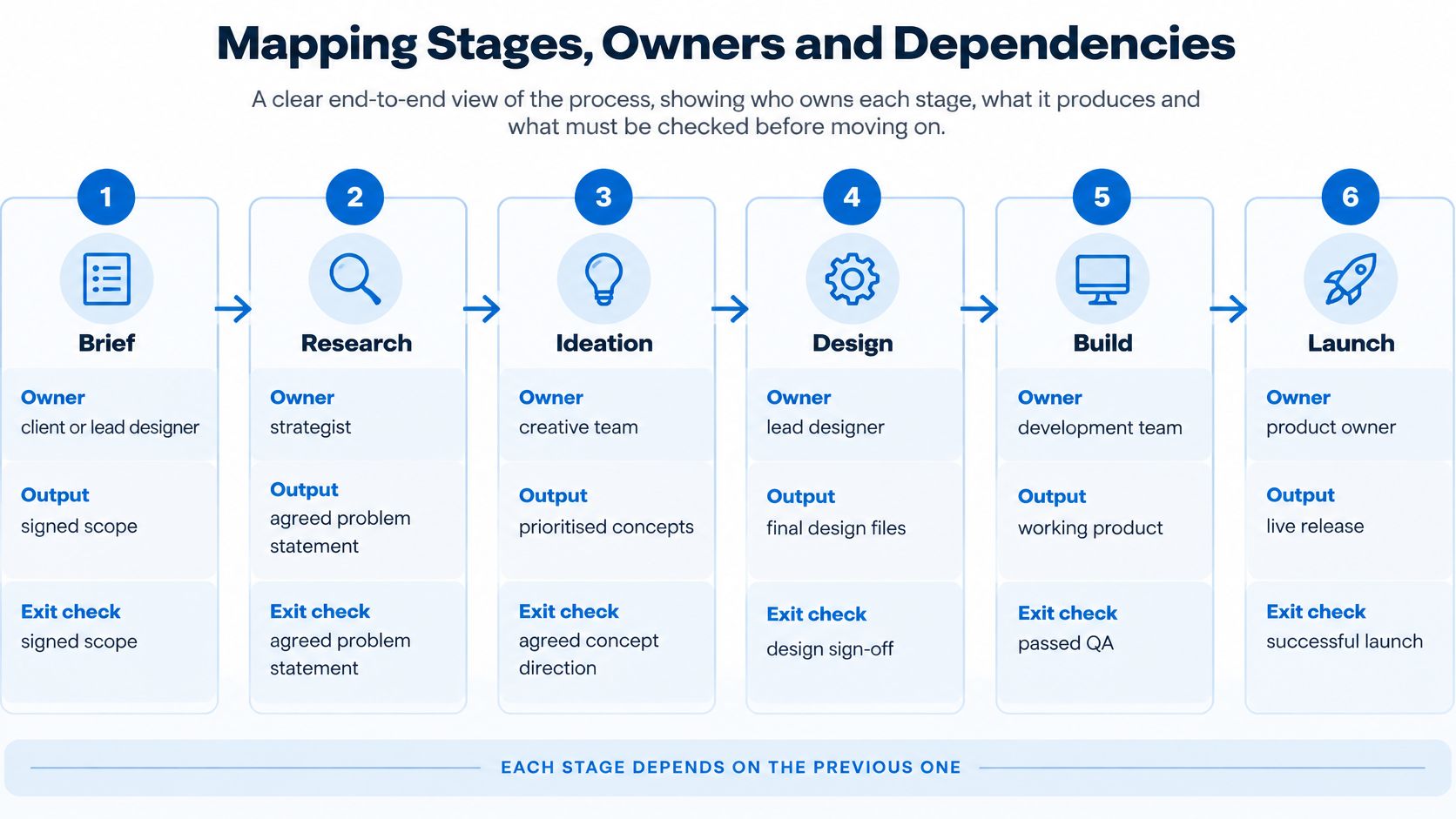
The diagram is a planning aid, not a demand for a rigid sequence. Research might expose a problem with the original scope, and a concept review might reveal missing evidence. When that happens, reopen the relevant decision explicitly rather than letting people work from different assumptions.
Modern scheduling methods have roots in Cold War programs coordinating linked activities, including PERT and CPM, as described in PMI's history of project management.
Find the work that's waiting
Dependencies work like a relay. A late baton slows the team even when every runner is fast.
Say you're producing a landing page. The copywriter needs two working days in this hypothetical schedule. Image selection waits for approved copy, development waits for the approved layout, and legal review needs the final wording. If the copy slips, several downstream commitments may move, not just the writing deadline.
Distinguish these dependency patterns:
- Finish-to-start chains: A developer needs an approved layout before building the final page.
- Parallel work sharing an input: An illustrator and designer can work together once the campaign message is agreed.
- Reverse information flows: A late legal comment changes the claim, forcing the writer and designer to revisit completed work.
The last pattern deserves particular attention. A process model for integrated modular design uses a dependency structure matrix to map information exchanges and reduce backward flows that create rework. A studio can apply the underlying principle without adopting a complex modeling system: identify who needs what information before they proceed.
Make blocked work visible
For each deliverable, record its required input, contributor, approver, expected issue date, and downstream tasks. Separate the person supplying information from the person approving it. They aren't necessarily the same person.
Use visible task statuses such as Backlog, Todo, and Done, with a clear blocked label where needed. A task shouldn't appear ready merely because its due date is approaching. When choosing project management scheduling software, prioritize whether teammates can see those dependencies over how impressive the calendar looks.
Check blocked work during the weekly production review. Ask what input is missing, who will obtain it, and which commitment changes if it doesn't arrive.
Book review slots before production begins, too. An available designer doesn't guarantee an available approver. Listen for the phrase once we have: once we have the copy, once we have legal approval, once we have the product images. That phrase usually identifies a task your schedule needs to show.
How to Write a Design Brief That Holds Up
A useful design brief gives reviewers a basis for judgment before they see the work. Without that agreement, a designer can satisfy the request and still disappoint the person approving it.
Establish the decision before the deliverable
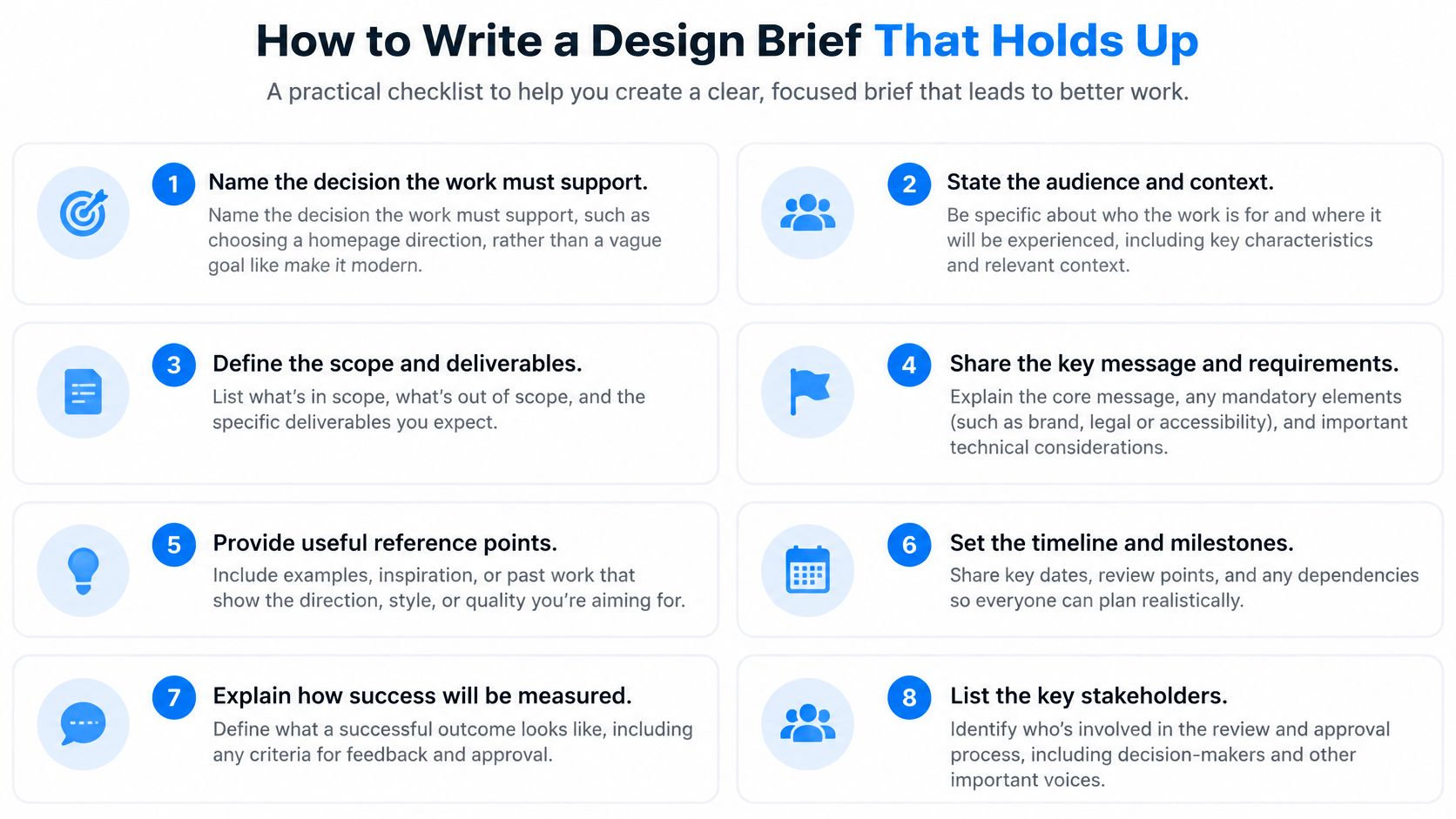
Name the decision the work must support. Choosing a homepage direction is a usable decision; making the website feel modern isn't. Replace adjectives with a question the reviewer can answer.
State the audience and the action they should take. Describe the relevant situation, such as a first-time buyer comparing product suitability before requesting a demonstration. Avoid treating everyone who visits the website as the same audience.
Set checkable success criteria. Include the agreed conversion target, accessibility requirements, or performance budget where relevant. Name how each criterion will be tested so nobody substitutes personal preference at approval.
List constraints. Record brand rules, channels, technical limits, and mandatory legal copy. A link to the current brand library is more useful than asking the designer to follow the usual guidelines.
Set the budget and review dates. Agree the included review rounds in writing and identify when stakeholders must respond. Leaving rounds unlimited makes the production estimate incomplete.
Record assumptions and their approvers. If the team assumes photography will be supplied or a product claim has legal clearance, name who will confirm it. An unnamed approver leaves an assumption unresolved.
Get sign-off and establish the baseline brief. Keep the approved version available and log subsequent changes against it. Updating a document without a record makes it impossible to distinguish an original requirement from a later request.
Use this checklist when preparing the document for approval.
Turn the brief into a working agreement
For example, a hypothetical product landing page brief could specify a target increase in qualified demonstration requests, two review rounds, and Maya, the client's marketing lead, as the final approver. The analytics owner would enter the actual conversion target and baseline before sign-off, rather than leaving the designer to invent them.
Also state what isn't included. If translation, photography, or development sits outside the commission, say so before stakeholders assume the design fee covers it.
Keep the brief short enough for the people judging the work to read and discuss. Attach detailed specifications separately, but don't hide the central decision, exclusions, or approval authority in an appendix.
Running Feedback Rounds Without Endless Revisions
Feedback arrives by email, chat, presentation comments, and side conversations. Some notes contradict each other; others reopen a decision that the designer thought was settled. Acting on every message immediately turns review into uncontrolled production.
Unlimited revisions aren't the same as good service. They leave the team without a reliable stopping point and let stakeholders add work without seeing the effect on cost or delivery.
| Feedback type | Typical example | Who decides | Routing rule |
|---|---|---|---|
| Factual error | Wrong product name or price | Content owner | Fix in the current round |
| Accessibility or brand rule | Text contrast below AA or off-palette colour | Design lead | Fix in the current round |
| Taste preference | Prefer a different hero image | Named approver | Log it and decide once per round |
| Scope change | Add a new landing page | Client and project lead | New brief and new quote |
| Missing input | Logo files not yet supplied | Client | Pause the task and reset the date |
Classify before assigning changes
Collect comments in a shared review location for each round. The project lead then creates a numbered log, removes duplicates, and marks each item as a fix, question, or scope change.
Don't translate ambiguous comments into design instructions. If a stakeholder asks for more impact, ask which audience need or brief criterion isn't being met. The designer needs a problem to solve, not a guess about the reviewer's taste.
Give each accepted item an owner and record the response deadline. Close it with a decision and a reference to the revised asset, rather than leaving reviewers to infer whether anyone acted.
A review round ends with resolved decisions, not merely a new file.
Handle exceptions without hiding their consequences
A late stakeholder shouldn't automatically restart production. The project lead checks whether the comment identifies a release-blocking error, an optional improvement, or a change that needs a revised commitment.
If the client requests a new creative direction midway through review, compare it with the approved scope before assigning it. If approvers disagree, send the conflict to the named decision owner instead of asking the designer to satisfy incompatible instructions.
Useful pushback is specific: This changes the agreed scope. We can prepare a revised cost and delivery date before starting it. Follow that explanation with the actual affected deliverables and dependencies, not a vague warning about delays.
Track revision count per deliverable and average time from feedback receipt to a recorded response. Also record why extra rounds occurred. A factual correction, a changed business requirement, and an unresolved preference call for different process improvements.
Handing Off Approved Work Without Losing the Record
The client says they approved the campaign, but nobody can identify the approved version. Sending another folder won't resolve that uncertainty. Establish the accepted asset before you package anything.
Give each approved asset a version identifier, approval date, and link to its decision in the feedback log. Only that version moves into the delivery package.
Package the work for its next owner
Confirm the quality check passed. Match the final work against the brief's acceptance criteria, including content, responsive behavior, and applicable accessibility checks. Resolve outstanding exceptions or document who accepted them.
Export the agreed formats and sizes. Use a consistent naming convention that identifies the asset, channel, and version. Remove obsolete exports from the delivery folder.
Package editable sources and usage records. Include source files, third-party assets, and license documentation. Supply fonts only where their terms permit transfer; otherwise explain how the recipient obtains them.
Write a short handover note. State what was delivered, where it lives, who maintains it, and any known limitations. For a landing page, include the implementation assumptions the developer needs.
Record acceptance in writing. Identify the accepting person and the delivered version. A general expression of enthusiasm isn't a dependable acceptance record.
Confirm the agreed support window. Explain how the client reports delivery defects and when that support ends. Route enhancements and later requests into new work.
Archive the project record. Preserve the brief, approvals, discussions, working files, and final package together. Apply the organization's retention and access rules.
Closeout check: Can someone who didn't attend the final review identify what was accepted and why?
A handoff without that record can lead to avoidable rebuilding, disputed requests, and fresh estimates for work the client thought was included. The aim isn't a larger archive; it's an intelligible transfer of responsibility.
Handoff is complete when acceptance is recorded, not when the files are sent.
Measuring Design Work Beyond Delivery Dates
A landing page can arrive on time and still confuse prospective buyers. Delivery metrics tell you how the team worked; outcome metrics help establish whether the work served its purpose.
Keep both. Judging designers only by asset volume encourages output without giving the team a reason to question whether those assets are useful.
| Metric type | Example | Measured when | Owner |
|---|---|---|---|
| Cycle time | Days from brief sign-off to approved asset | At handoff | Project lead |
| Revision count | Review rounds per deliverable | At approval | Project lead |
| On-time completion | Share of milestones met | Weekly | Project lead |
| Task success | Completion rate in a usability test | Before and after launch | UX researcher |
| Adoption | Active users of the redesigned flow | At agreed early and follow-up checkpoints | Product owner |
| Accessibility conformance | Pages passing agreed WCAG AA checks | Before launch and after each update | Design lead |
Agree the evidence before production
At kickoff, choose an outcome the design can plausibly influence, name its owner, and record a baseline. Define the measurement method as well as the target. A qualified lead, for example, needs an agreed definition before anyone compares results.
The reporting challenge is substantial: Small Business Trends' coverage of Smartsheet's 2025 survey of more than 1,200 marketing and creative professionals reports that 94% struggled to demonstrate business impact and 53% lacked visibility into information needed for decisions.
A dashboard won't fix missing definitions or inaccessible evidence. Put the measurement plan beside the deliverable, and give the outcome owner a scheduled follow-up task. Store test findings and analysis where the project team can retrieve them.
Separate influence from attribution
Design rarely acts alone. A campaign's results may change because of pricing, audience targeting, product availability, or sales follow-up.
Use before-and-after comparisons cautiously and record those other changes. Where feasible, use an A/B test that isolates the design variation. Don't attribute every improvement to the redesign because it launched first.
Before approving production, check:
- Metric: What behavior or quality will you measure?
- Baseline: What happens today, measured using the same method?
- Owner: Who gathers and interprets the evidence?
- Timing: When will enough relevant evidence be available?
- Context: What other changes could affect the result?
That makes business impact a planned part of delivery rather than a claim assembled after launch.
Using AI Agents Without Losing Accountability
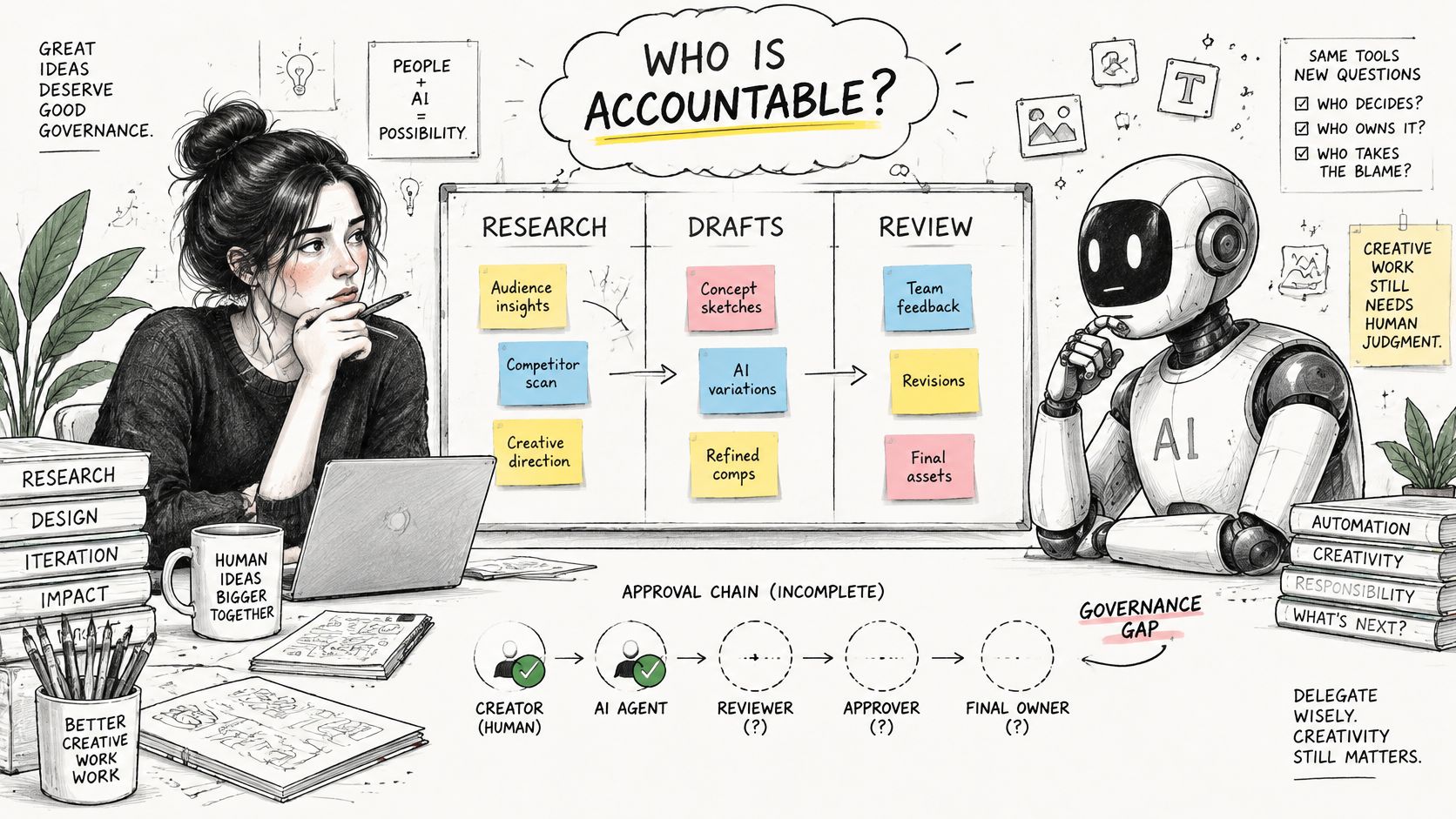
Which design tasks can an AI agent handle, and who answers for the result? Enthusiasm alone doesn't settle either question: Cella's 2025 report found that 63% of creative professionals viewed AI as a productivity enhancer, while only 5% reported strong proficiency.
The useful working arrangement is collaboration with explicit responsibility, not unattended production.
Set the operating boundaries
- Permitted independent work: Allow bounded tasks such as drafting variants or summarizing feedback into a clearly marked draft. Permit status updates only when the agent can verify the required condition.
- Human approval gates: Require review before publishing client-facing copy, releasing final assets, or changing brand and legal decisions.
- Traceable inputs: Keep relevant prompts, source references, and output versions so reviewers can inspect the basis for a result.
- Confidentiality controls: Specify which client materials may enter approved tools. Don't let an agent decide whether sensitive information is safe to share.
- Named accountability: Assign a human owner to every assisted output, including responsibility for factual, accessibility, and bias checks.
Access should match the task. If an agent edits something outside its assignment, stop the workflow, preserve the action history, and inspect affected work before restoring access. Activity records should distinguish agent actions from human actions and identify the authorizing user.
The embedded video provides an additional viewing resource.
Check whether automation reduces coordination work
Faster drafting can encourage stakeholders to request more variants and more revisions. Measure the time people spend checking, correcting, and routing AI-assisted work, not just the quantity generated.
Keep intake limits tied to actual review capacity. An agent that produces drafts faster than an approver can assess them has moved the bottleneck, not removed it.
Before delegating, ask: May the agent access this material? What can it change without approval? Who will verify and accept the result?
Run One Live Project Through This Workflow
Choose a live project rather than changing the whole portfolio. For a practical trial, run the workflow for a fortnight and inspect the project record at the end, even if delivery is still underway.
Establish your starting point before changing how people work. Use a comparable completed project to understand cycle time and revision count, then record the current baseline for the live project's chosen outcome. If you lack historical records, label the delivery baseline unknown rather than inventing precision.
Test the record, not just the board
Keep the brief, dependency list, feedback log, and measurement plan attached to the work. Ask a teammate who missed a review to find the current decision and identify the next action. If they need someone to reconstruct the conversation, the record isn't yet usable.
Tuff is an option for this arrangement. We combine projects, tasks, chat, docs, announcements, time tracking, and AI agents in one app; each project holds its tasks, chat, docs, and announcements, while documents, uploads, and links stay inside the project they belong to.
The criteria matter more than the product. Your team needs a place where approved requirements, working discussions, and accountable actions remain connected.
- Inspect waiting time: Which inputs or decisions held up progress?
- Inspect rework: Which changes were preventable, and which were legitimate discoveries?
- Inspect evidence: Can the outcome owner retrieve what they need to evaluate the work?
Review those findings with the team before expanding the process. Keep the controls that clarified decisions, simplify anything people duplicated, and test unresolved problems on the next project before changing the whole studio.
Tuff gives your team a shared place for project tasks, conversations, documents, files, and time records, so design decisions stay connected to delivery. Visit Tuff and try this workflow on a live project, then use the record to decide what your studio should change.