
Tuff Pricing and Plans: Costs, Limits and How to Choose
Compare Tuff pricing and plans: Duo is free, Team costs $25 a month, and larger plans add people and storage. Learn limits and how to choose.

You're three weeks into a client project, a contractor needs access today, and your admin asks a question nobody can answer quickly. Will adding one more person change this month's bill, and by how much? With per-seat tools, you check licences, true-ups and guest rules before you can give a straight answer. With flat pricing and plans, the answer is simpler, but only if you know where your workspace sits against its limits.
Treat this as a capacity decision, not a feature decision. Your monthly fee won't move because you added a collaborator on a Tuesday. It moves when people or files cross a stated ceiling. That makes forecasting your job. Count the people, estimate the storage, decide on AI agents, and you'll know your maximum predictable monthly cost before finance asks.
What Each Tuff Plan Includes and Costs
We charge one flat monthly price per workspace across four plans, and only three limits decide your choice. Those limits are people, files and AI agent access. Everything else is included on every plan.
Tuff plans compared
| Plan | Monthly price | People included | Files included | AI agents | Maximum cost per person |
|---|---|---|---|---|---|
| Duo | Free | 2 | 250 MB | No | Free |
| Team | $25 | 10 | 25 GB | Yes | $2.50 |
| Company | $99 | 100 | 100 GB | Yes | $0.99 |
| Unlimited | $299 | Unlimited | 1 TB | Yes | Falls as headcount grows |
The three limits that matter
Duo is free for two people with 250 MB of files and no AI agents, and you don't need a card to start. Team costs $25 a month for up to 10 people and 25 GB, with AI agents included. Company costs $99 a month for up to 100 people and 100 GB, also with AI agents. Unlimited costs $299 a month for any number of people with 1 TB, again with AI agents.
Every plan includes the same workspace features, so you're not buying your way out of a feature gate. You get projects with unlimited tasks, board views, project chat with task mentions, documents and files kept within projects, time logging and team statistics on each one. The only feature gated by plan is AI agent access, which starts at Team.
The maximum cost per person tells you how the flat fee spreads at full capacity. It's $2.50 on Team, $0.99 on Company, and a figure that keeps falling on Unlimited as headcount grows. If you're also comparing specialist tools while you consolidate, it's worth checking how other flat or tiered offers present their ceilings, for example AdCrunch plans for media buyers, and applying the same test. What's the billing unit, and what triggers the next tier?
Prices here are in US dollars before applicable tax. Use these four rows as your reference for every calculation that follows.
How Flat Workspace Pricing Works
Think of it as paying for an office suite, not a desk for each worker. The bill stays the same while people and storage fit inside the suite you chose. We charge one price for the whole workspace, not per seat, in US dollars plus tax where it applies.

Two variables decide whether that price holds, active people and storage consumed. Exceed either one and you'll need a plan decision, so headcount alone never tells the whole story. That's the predictable end of the software market. The Mordor Intelligence SaaS market report reported that subscription-based pricing accounted for 67.14% of SaaS revenue in 2026, while usage-based pricing was forecast to grow faster around it.
The step-up arithmetic
- Duo to Team: adds $25 a month for up to 10 people and 25 GB.
- Team to Company: adds $74 a month for 90 more people and 75 more GB.
- Company to Unlimited: adds $200 a month, removes the people ceiling and adds 900 GB, bringing storage to 1 TB.
Run that arithmetic before you're blocked mid-project. Your planning question isn't how many people exist today. It's how the workspace will be used over the next year.
Choosing the Plan That Fits Your Team
Don't start with the plan name. Start with two counts and one yes or no decision, then pick the smallest plan that covers all three.
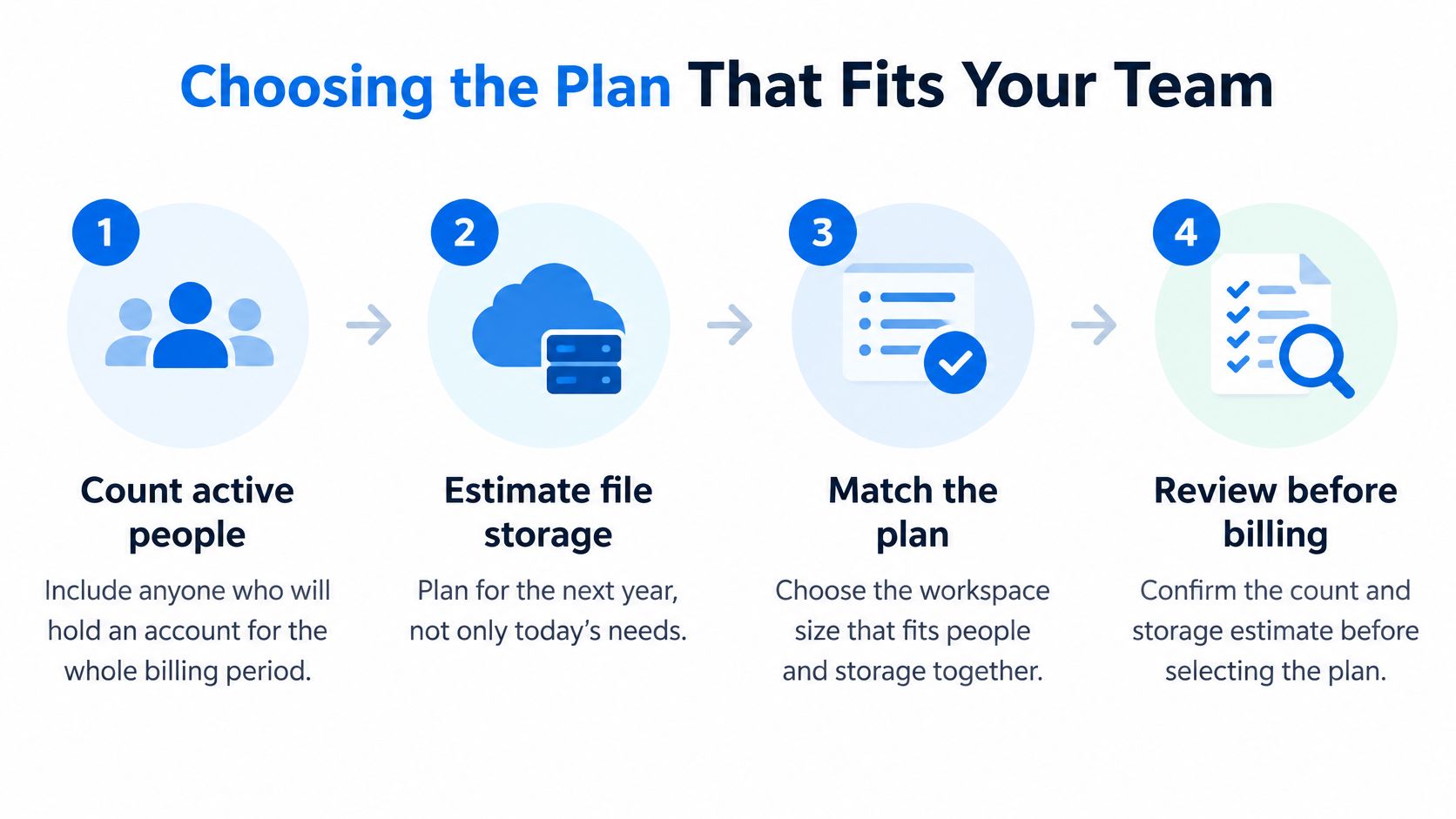
Run the five steps
- Count active people. Include anyone who'll hold an account for the whole billing period, not just core staff. Contractors and clients who log in regularly belong in this number until you've confirmed otherwise.
- Estimate file storage for the next year. Today's usage understates it. Add project files, documents and media you expect to keep inside projects, then add growth from the work already sold.
- Choose the smallest plan that covers both numbers. People and storage have to fit together. A plan that fits your team but not your files doesn't fit.
- Check whether you need AI agents. If you do, Duo is out and Team is your minimum. That's a hard line, not an add-on you can bolt onto Duo.
- Leave a buffer. If you're within one or two people or a few gigabytes of a ceiling, the next plan up often costs less than being blocked mid-project. Buy headroom when delivery dates are fixed.
Confirm one question with us before you commit, whether guests and contractors count against the people limit for your workspace setup.
That answer changes the count in step one, so get it in writing before you forecast. If you're still comparing categories while you decide, our guide to project management tools and how they differ helps you separate workspace features from pricing structure.
Plan choice by team scenario
| Scenario | Active people | Storage need | Plan | Monthly cost |
|---|---|---|---|---|
| Freelance pair, no agents, files under 250 MB | 2 | Under 250 MB | Duo | $0 |
| Two-person agency using AI agents | 2 | Under 25 GB | Team | $25 |
| Studio with 10 staff and contractors | 10 | Under 25 GB | Team, if total stays at 10 or fewer | $25 |
| Team of 50 consolidating tools | 50 | Under 100 GB | Company | $99 |
| Company of 150 with heavy media | 150 | Heavy media, within 1 TB | Unlimited | $299 |
Say you're a two-person freelance pair with light files and no agents. Stay on Duo at $0 and spend nothing. The same pair wanting agents should move straight to Team at $25, because Duo can't connect one. A studio listing 10 staff and contractors stays on Team only while the total stays at 10 or fewer. Person eleven changes the answer.
A 50-person team consolidating tools lands on Company at $99, with room to double headcount before people force a move. A 150-person company with heavy media belongs on Unlimited at $299, where storage becomes the number to watch. In each case, Duo's no-card start for two people with 250 MB makes it a low-risk way to test a real project before you pay.
AI Agent Access on Paid Plans
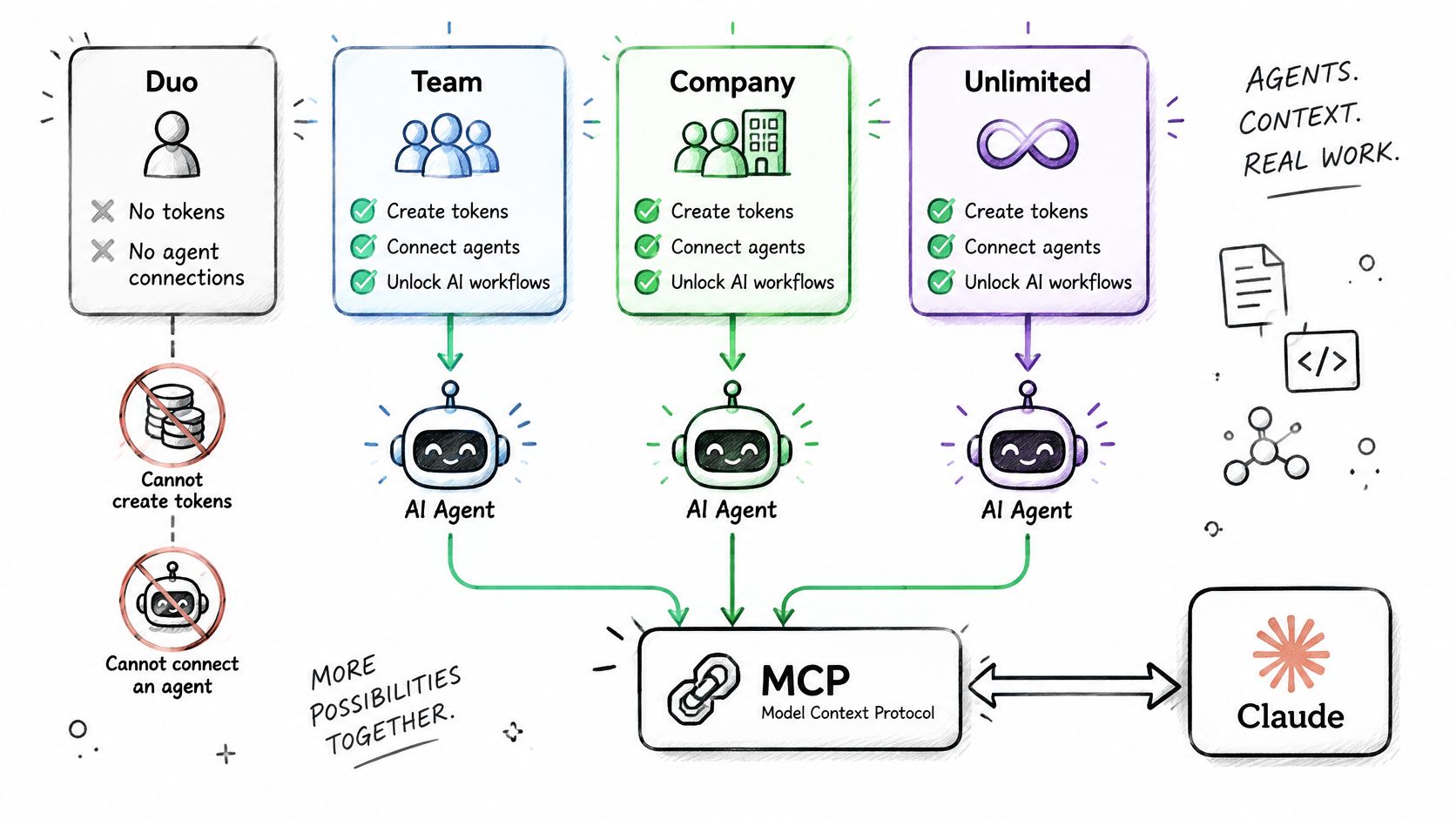
The rule is blunt. AI agents are available on Team, Company and Unlimited, and a Duo workspace can't make tokens or connect an agent. If agents are part of your workflow, you're on a paid plan.
Agents connect through the Model Context Protocol (MCP) to Claude, ChatGPT, Claude Code or any other MCP-compatible tool. An agent reads and writes with the authorizing user's identity, it can't delete content, and every action appears in the activity feed so you can trace it. That's the right shape for production work, attributed and constrained rather than anonymous and destructive.
Treat this as an identity and permission decision, not a feature add-on. The MCP specification states that clients must obtain explicit user consent before invoking tools and that hosts should treat tool descriptions as untrusted unless they come from a trusted server. Its authorization guidance also requires validation that access tokens were issued specifically for the intended MCP server.
Before you enable agents
- Scope the exposure: decide which projects and data classes the authorizing user may expose, and don't default to the whole workspace.
- Require explicit approval for write actions: reads inform, writes change client work.
- Rotate or revoke credentials when roles change: a leaver's agent access should end with their access.
- Review the activity log on a schedule: weekly during rollout, then monthly once behaviour is predictable.
Practical rule: give an agent the narrowest user identity that can do the job, then widen it only when a logged task fails for lack of access.
A concrete use case shows the value. Linear, Jira, ClickUp and Basecamp each have a connector that lets an agent move projects into your workspace, which works well for a team's handful of projects. That can replace hours of manual recreation during a migration. For broader workflow ideas, our guide on using AI for project management covers where agents help and where they shouldn't act alone.
Agent access is worth paying for when it saves manual migration or repetitive updates you can verify in the feed. It isn't worth it as a novelty. Scope it as carefully as any other workspace access, because that's what it is.
What Happens When You Upgrade, Downgrade or Hit a Limit
Plan changes shouldn't surprise you. The rules below decide both your bill and whether your team can keep adding people and files.
Plan change and limit rules
| Event | What happens | Billing effect |
|---|---|---|
| Upgrade to a bigger plan | New price applies immediately | Difference charged for the rest of the period |
| Downgrade to a smaller plan | Amount already paid counts toward the new price | Credit applied to the new price |
| Workspace exceeds people or storage limit | Nothing is deleted, but no one can add people or files | Resolved by upgrading or making room |
| Tuff raises a plan price | Workspace owner is told at least thirty days before the change applies | New price applies after the notice period |
When you move to a higher plan, the price changes straight away and the difference is charged for the rest of the period. When you move to a smaller plan, what you've already paid counts toward the new price. If you go over a people or storage limit, nothing is deleted, but no one can add people or files until the owner upgrades or makes room. If we raise a price, the workspace owner hears at least thirty days before it applies.
Why the real bill can differ
The headline price isn't always the total you should budget. Storage growth, AI agent activity, tax, currency conversion and the cost of moving between capacity tiers all shape the actual figure. The wider market is moving toward less predictable bills. The 2025 State of Monetization Report, from a 2025 survey of 240 software and AI companies, found hybrid pricing rose from 27% to 41% in one year while flat-fee subscriptions fell from 29% to 22%.
That shift is exactly why you should calculate your maximum predictable monthly cost in advance. It's your current plan price plus tax where it applies, plus the prorated difference if a forecast upgrade lands mid-period. If you're comparing that discipline with free tiers elsewhere, our roundup of free project management scheduling software shows where free limits tend to bite first.
Run this check before any change
- Compare current people and storage with the next limit: name which ceiling you're approaching.
- Estimate the prorated difference for the remaining period: don't budget the full new price twice.
- Identify the driver: people-driven growth needs a higher people ceiling, storage-driven growth may be fixed by archiving or removing files.
Set a monthly checkpoint and act when usage reaches about 80 percent of either limit, not when uploads start failing.
That buffer gives the owner time to upgrade or make room without stopping delivery. It's a small admin habit that prevents the only disruptive outcome in the table, a workspace that can't accept the next person or file.
Renewals, Refunds and Cancellation Rules
Paid plans renew automatically every month or year until you cancel. There's no manual repurchase step, which is convenient, but it puts the renewal date in your calendar whether you add it there or not.
Polar handles payment as merchant of record. It takes the payment, charges applicable tax and sends the invoices. If finance asks why the invoice name differs from the product name, that's the answer.
Refunds in plain terms
You can get a full refund within 14 days of your first payment for a paid plan, and you don't have to give a reason. Use that window deliberately. Run a real project in the first two weeks, not a toy test, so the decision is based on actual people, files and chat.
Monthly and yearly renewals are not refunded. Cancel before the next renewal and you won't be charged again. We do refund at any time if you were charged twice, charged after cancelling, or couldn't use what you paid for because the service was down long enough. If you're building your own policy library for comparison, you can review the eSignature refund policy as an example of how another software company states its windows and exceptions.
How cancellation works
- Open the workspace settings.
- Cancel the plan.
- Keep using the paid plan until the end of the period already paid for.
- Return to the free Duo plan when that period ends.
Plan for step four if your workspace is larger than Duo allows. Duo means two people and 250 MB, so the over-limit rule applies on return. Nothing is deleted, but no one can add people or files until the workspace fits. Reduce members or files before the paid period ends, or expect a workspace you can view but can't grow.
Put two reminders in your calendar on day one, the end of the 14-day refund window and the next renewal date.
Those two dates decide whether a refund or cancellation stays simple. Miss the first and you've bought the first period. Miss the second and you've bought another one.
When a Flat Plan Beats Per-Seat Pricing
No pricing model wins for every team, and you should distrust anyone who says otherwise. Flat workspace pricing is strongest when participation is broad but uneven. It's weaker when a few people consume disproportionate resources.
Think of an agency with many occasional clients in project chat, contractors who need access only during a sprint, or a studio whose staffing changes with each production. Under per-seat pricing, you pay for access patterns that don't match how those people work. Under a flat plan, they fit inside capacity you've already bought. The 2025 State of SaaS Pricing report.pdf), from a 2025 survey of 321 pricing leaders, found that no model consistently outperforms others.
The 50-person worked comparison
Annual cost for a 50-person team
| Setup | Monthly cost | Basis |
|---|---|---|
| Tuff Company plan | $99 | Flat fee, up to 100 people and 100 GB |
| Slack Pro and Asana Starter | $1,112 | Implied, $12,156 a year more than the Tuff plan |
For a team of 50, Company costs $99 a month, or $1,188 a year. The stated comparison is that the same team using Slack Pro and Asana Starter costs $12,156 more per year, which implies roughly $13,344 a year, or $1,112 a month, for that setup. That's a large gap, and it's driven by arithmetic you can check. Fifty seats multiplied across two tools grows faster than one flat workspace fee with headroom to 100 people.
Treat it as one scenario, not a universal result. It assumes that team would otherwise pay for both tools for all 50 people, and that its files stay within 100 GB. Change those inputs and the gap changes. A five-person team with very high storage needs, for example, could find a flat plan less advantageous if storage forces a tier its headcount doesn't need. Heavy AI-related consumption deserves the same scrutiny wherever it's billed separately.
Answer these before you compare
- Inactive members: do they count toward the plan while their accounts remain?
- Guests: do clients and occasional collaborators consume capacity in the same way as staff?
- Mid-cycle changes: is a tier change prorated for the rest of the period, and how is credit applied on a downgrade?
- Storage behaviour: what counts toward the file limit, and can you make room without losing project history you still need?
Build your own break-even check from those answers. Multiply your realistic active headcount by any per-seat alternatives, add the tools you'd still need separately, then compare it with the flat fee for the capacity you'd occupy over twelve months. Include occasional collaborators and project duration, not just payroll headcount today.
My recommendation is direct. Choose flat workspace pricing when many people touch the work irregularly and you value a bill you can state in one sentence. Choose per-seat or usage-based pricing only when your participant count is small, stable and easy to licence, or when a few users drive costs that a capacity tier would overcharge you for. Forecast people and storage first, and the right model usually names itself.
Start on Duo with a real project for two people, no card needed, then move to Team, Company or Unlimited only when your people count, file storage or AI agent needs say so. You'll keep projects, tasks, chat, documents, files and time logging in one workspace for one flat monthly price instead of a new charge for every collaborator. Visit Tuff to pick the capacity that fits your next year of work, not just this week.