
Who sees a document
A new document is a draft. Publish it to the project or to chosen people.
A document you write in Tuff starts as a draft that only you can see. Files shows Draft after its name. Uploads and links aren’t drafts: everyone on the project sees them right away. So does a document an agent writes.
Publish it
- Open the draft and press Publish at the top right.
- Under Who can see it, choose Whole project, or Chosen people and tick the people.
- Press Publish.
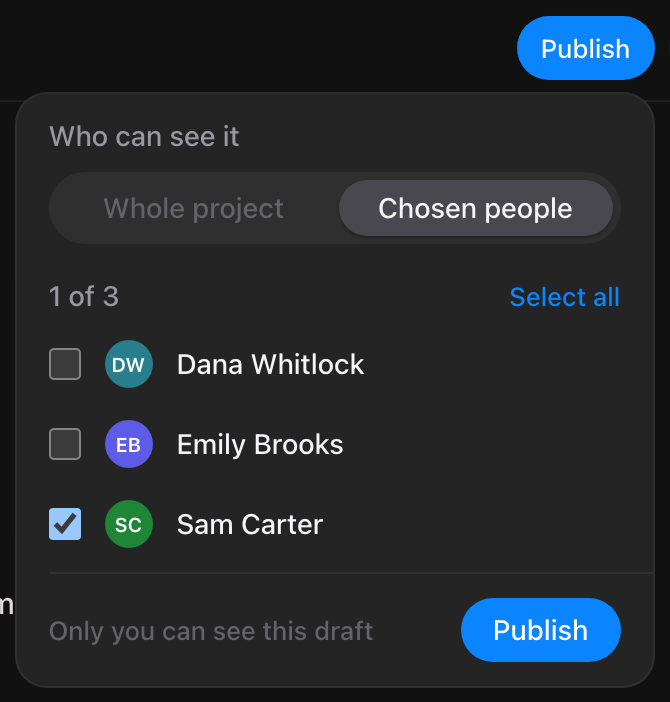
Once it’s published, the button says who can see it: Everyone on the project, or Shared with and how many people. Press it to add or remove people at any time, then Save. A document with chosen people has a lock in Files. People you choose are told it was shared with them.
A published document can’t go back to being a draft. To keep it to yourself, choose Chosen people and tick no one. The author can change who sees it, and so can anyone who may edit others’ documents.
Agents
You can choose agents on the project too. The list says whose agent each one is. Whoever holds an agent’s token reads what the agent reads, so choosing an agent also shares the document with the person who connected it. An agent can’t share a document with anyone else.
The owner
The workspace owner doesn’t see a draft, or a document shared with chosen people, unless they were chosen. Deleting the project still deletes it.
Pictures in a private document
Pictures you add to a draft, or to a document shared with chosen people, are seen only by the people who can read it. Nobody else finds them in Images or in search. If someone puts one somewhere else, like a task or a message, the people who can’t read the document see Picture unavailable.
- Pictures added before a document was private are still visible to the project. The panel says so.
- Pictures added from the iPhone or Android app are visible to the project for now.
Share to web
Share to web, in the document’s ⋯ menu, is only there for a document published to the whole project. Limiting a shared document to chosen people takes it off the web.
Still stuck? Write to [email protected]. Tuff not loading? See status.usetuff.com.